What Is an Outliner? A Beginner's Guide to Outline-Based Note-Taking
Outliners organize notes as nested, collapsible bullet points instead of documents. How outline-based note-taking works, when it beats a blank page, and how to start.
By corone · · Note-Taking Basics · 7 min read
Open most note apps and you get the same thing: a blank document. A title, a cursor, and an implicit demand that you already know what you want to say and in what order. An outliner makes a different bet. Instead of a page, it gives you a tree — every note is a list of short lines, and every line can hold more lines nested underneath it.
That one structural change turns out to matter far more than it sounds. This article explains what outliners are, why people who try them rarely go back to documents for thinking-heavy work, and how to get started without over-engineering anything.
The core idea: notes as trees, not pages
In an outliner, the unit of writing is not the paragraph but the bullet — one line holding one thought. Bullets nest: a claim has its supporting evidence indented under it, a project has its tasks under it, a meeting has its agenda points, and each agenda point has the discussion under that. Three operations do most of the work:
- Indent and outdent — move a line deeper into or out of the hierarchy, changing what it "belongs to."
- Collapse and expand — hide or reveal everything nested under a line, so a two-hundred-line note can read as five top-level points.
- Zoom — focus on one branch as if it were its own note, ignoring the rest of the tree entirely.
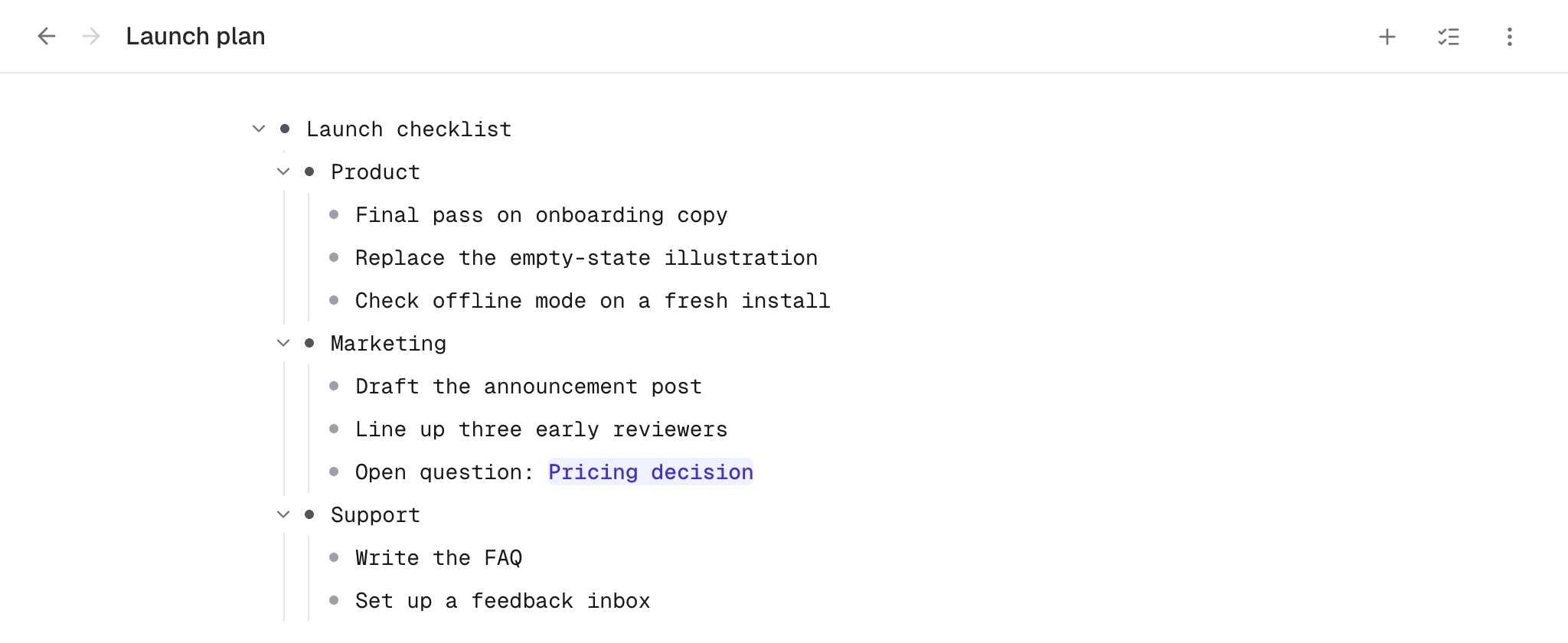
Here is that shape in Indenta, using a small launch checklist as the example: one top-level line, three branches under it, a few short lines under each branch. The arrow beside a line is its collapse toggle, and clicking the bullet zooms into that branch.
A document forces you to serialize your thinking — everything must appear in one final order. An outline lets structure stay provisional. You can capture ten points in whatever order they occur to you, then drag them into shape afterwards. Reorganizing a document means cutting and pasting paragraphs and fixing the seams; reorganizing an outline means dragging a bullet, and its whole subtree comes along.
Why this works: structure mirrors how ideas actually arrive
Ideas rarely arrive in essay order. They arrive as fragments — a claim here, a counter-example there, a task you suddenly remember mid-thought. Documents punish this: either you interrupt your flow to find the right place for a fragment, or you dump it at the bottom and lose it. Outlines absorb fragments naturally, because adding a line anywhere is cheap and moving it later is cheaper.
Collapsing is the other half of the magic. Long documents get harder to navigate the longer they grow; long outlines don't, because you only ever look at the level of detail you need. A year of project notes can sit in one note, folded down to a dozen headings, and still open to any detail in two clicks. Writers know this pattern as "progressive disclosure"; for outliner users it is simply how notes work.
What outliners are best at
- Meeting notes. Agenda items become top-level bullets before the meeting; discussion, decisions, and action items nest under each as it happens. Afterwards, collapse everything and the summary writes itself.
- Project planning. Break a goal into workstreams, workstreams into tasks, tasks into steps — and re-cut the tree as the plan changes, which it will.
- Research and study notes. Sources, quotes, and your own commentary keep their relationships visible instead of blurring into paragraphs.
- Drafting. Many writers outline the argument first, expand each bullet into sentences, and only "flatten" into a document at the very end.
- Daily notes and journals. A dated bullet list captures a day faster than prose, and stays scannable months later.
What outliners are not for
Honesty helps here: an outline is a thinking and organizing format, not a publishing format. Final prose — an essay, documentation, a letter — eventually wants paragraphs, and forcing finished writing to live as bullets serves nobody. The practical workflow is to think and structure in the outline, then export or copy the result out as a document when it is ready for readers. (Indenta, for what it's worth, has a "copy as document" export for exactly this step.)
Outliners are also a poor fit for heavily visual material — moodboards, canvases, freeform diagrams. Trees are for hierarchy; if your material has none, don't impose one.
A short history, for the curious
The idea is old. Dave Winer's ThinkTank popularized outline processors on personal computers in the early 1980s, and the format has resurfaced in every era since — from OmniOutliner on the Mac, to Workflowy's radical one-big-list design in 2010, to the current generation of networked tools that combine outlining with backlinks. When a format keeps getting reinvented for forty years, that is usually a sign it maps onto something real about how people think.
How to start (without overthinking it)
- Pick one recurring note type — meeting notes and daily notes are the easiest wins — and do it as an outline for two weeks. Don't migrate old notes.
- Keep lines short. One thought per bullet. If a line grows past two sentences, its second half probably wants to be a child bullet.
- Learn exactly four keys: Enter for a new line, Tab and Shift+Tab to indent and outdent, and your app's collapse shortcut. Everything else can wait.
- Restructure ruthlessly. The whole point is that structure is cheap to change. If a section feels wrong, drag it somewhere else and see.
Two weeks is usually enough for the format to stop feeling like a technique and start feeling like the obvious way notes should work. From there, features like links between notes and tags turn a pile of outlines into a genuine knowledge base — but the tree comes first.
Keep reading
- Three Levels of Indent Is Enough — Deep outlines feel organized and read like a maze. A before-and-after of a seven-level meeting outline, and the simple rule that fixed it.
- How Big Should a Note Be? Giant Files, Atomic Notes, and the Rule in Between — One giant file buries ideas; a thousand atomic notes shred them. A practical rule for deciding when a thought deserves a note of its own.
- Paper vs. Digital Notes: Stop Asking One to Do Both Jobs — Paper is better for thinking. Digital is better for keeping. Where each one genuinely wins, and a workflow that bridges them without transcription guilt.
About the author: corone is a software engineer in Japan who builds Indenta and uses it every day as their own primary note system. More about who makes Indenta.
Try it in practice: Indenta is a free, offline-first outliner — nested notes, backlinks, tags, and peer-to-peer sync, with no account required. Start writing in your browser, or read the User Guide first.