Tags vs. Folders vs. Links: How to Actually Organize Your Notes
Folders, tags, and links solve different problems, and most organizing advice confuses them. What each one is good for, and a division of labor that lasts.
By corone · · Note-Taking Basics · 7 min read
Every note app offers some mix of the same three organizing tools: folders to put notes in, tags to stick on them, and links to draw between them. And nearly everyone who takes notes seriously has, at some point, burned an afternoon reorganizing — migrating from folders to tags, or from tags to links, convinced the previous scheme was the reason old notes never resurfaced.
The reorganizations rarely help, because the problem is almost never the tool. It is that folders, tags, and links answer three different questions, and most systems quietly ask one of them to answer all three. Once you see which question each tool is actually built for, the arguments — tags versus folders, folders versus links — mostly dissolve into a division of labor.
Folders answer "where does this live?"
A folder is a location. Every note is in exactly one, and that exclusivity is both the folder's weakness and its entire value.
The weakness is famous: most notes plausibly belong in several places. Is a note about a client's API in Clients/Acme, in Engineering/APIs, or in Projects/Migration? A folder hierarchy forces a single answer, and whichever one you pick, future-you will look in one of the others first. Worse, the decision is demanded at the worst possible moment — capture time, when the thought is fresh and the filing question is an interruption. Deep hierarchies turn every new note into a small act of taxonomy, which is precisely the friction that kills capture habits.
The strength is the same exclusivity pointed at the right target: folders are unbeatable for notes with an obvious, unambiguous home — and for lifecycle, not topic. An archive folder for finished projects. A folder per client, when clients genuinely never overlap. A separation between work and personal so each context stays quiet. These are boundaries, and boundaries are what locations model well.
The practical rule: keep folders few, flat, and boring. If you can list your folders from memory, you have roughly the right number. A hierarchy more than two levels deep is usually topic-modeling in disguise — work that tags and links do better.
Tags answer "what kind of thing is this?"
A tag is a property, not a place. A note can carry several, which is exactly what the "this belongs in multiple places" problem calls for: the client API note can be #acme and #api at once, no custody battle required.
Tags fail differently. Because adding one costs nothing, tag vocabularies sprawl — singular and plural variants, synonyms, one-off tags used exactly once, a graveyard of #toread items nobody reads. A tag system with three hundred tags retrieves no better than no tags at all, because retrieval depends on remembering the vocabulary, and nobody remembers three hundred words the same way twice.
Tags earn their keep when they form a small, closed set of recurring dimensions that cut across whatever your notes are about. The useful ones are rarely topics — full-text search already finds topics. They are statuses (#draft, #active), types (#meeting, #decision, #recipe), and people or projects that recur across many contexts. The test for a new tag is simple: will this be roughly the tenth note to carry it, or the first? If you cannot name several existing notes the tag applies to, it is not a dimension of your thinking yet — skip it.
A vocabulary of ten to twenty tags, pruned once or twice a year, outperforms any elaborate ontology. As with folders: if you can recite the list, it is working.
Links answer "what is this connected to?"
Folders and tags are both categories — ways of grouping notes by something they share. Links are a different animal entirely: a link is a specific, chosen relationship between two particular notes. "This argument responds to that one." "This meeting produced that decision." "This recipe came from that person."
That specificity is why links age better than either alternative. Categories reflect how you understood a subject at the time you created the category, and understanding moves; taxonomies rot. A link records something smaller and more durable — that two ideas touched — and a note's meaning can keep shifting while its connections remain true. This is the insight the Zettelkasten method is built on: given enough real connections, structure emerges from the notes instead of being imposed on them, and no filing decision ever has to be made up front.
Modern note apps make the habit nearly free with wiki-style [[links]]: type the target note's name inline, mid-sentence, and the connection exists. Backlinks complete the loop — open a note and see every note that references it, including connections you made months ago and forgot. That reverse index is where linking pays compound interest, because it surfaces exactly the associations no category scheme would have predicted.
The failure mode, for completeness: linking is manual, per-connection work, and it cannot give you an overview. "Show me everything about Acme" is a tag question. Links will never answer it.
The division of labor
Put the three answers side by side and the system almost writes itself:
- Folders for the few hard boundaries — work versus personal, active versus archive. Lifecycle and access, not topic. Aim for a handful, kept flat.
- Tags for recurring cross-cutting dimensions — status, type, the people and projects that appear everywhere. A closed vocabulary you could recite.
- Links for actual relationships between specific notes — made inline, at the moment you notice the connection, with backlinks doing the remembering.
A small version of that division of labor looks like this in Indenta. The sidebar lists every tag with the number of notes that use it, which doubles as a quick read on whether your vocabulary has stayed small. In the open note, #review is a tag chip, [[Pricing decision]] is a link chip, and the dates are recognized as dates — three different answers living in the same few lines of text:
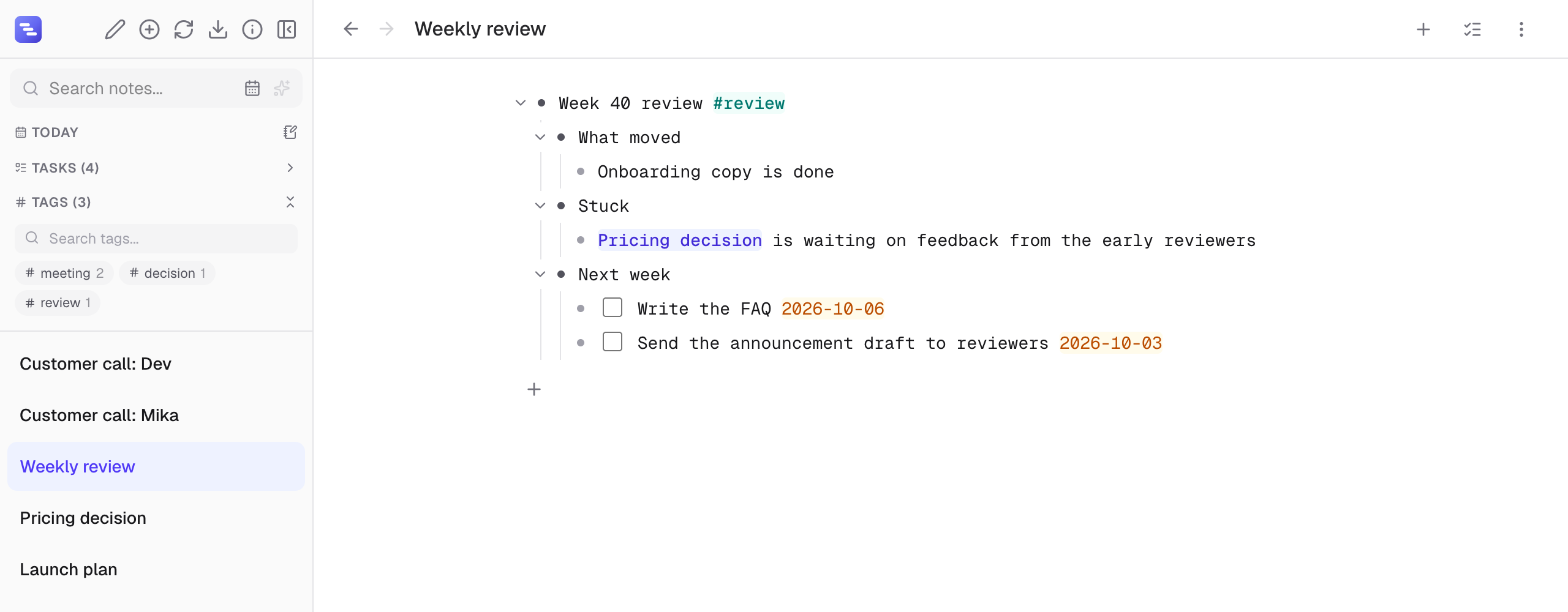
And underneath all three: search. Full-text search is the organizing tool nobody lists, and it quietly carries most real retrieval. You do not need a category for every topic your notes mention, because the words in the note already are the retrieval mechanism. Organize for the questions search cannot answer — boundaries, dimensions, relationships — and let search handle the rest.
Notice what this division eliminates: the migration project. You never need to convert a folder system to tags or tags to links, because they were never competing for the same job. Adding links to a foldered vault, or a status tag to a linked one, is additive — an afternoon of reorganizing nothing.
Where the structures actually come from
One more reframe, because it changes daily practice: organizing is not a separate activity you schedule. Done well, each structure gets created at a different moment, and none of those moments is "organizing time."
Folders are decided roughly once, when you set the system up, and rarely touched. Tags get attached in the seconds after capture, from a vocabulary you already know. Links happen during writing, when a connection occurs to you mid-thought — which is the only time you reliably notice connections at all. An outliner compresses this further, since one note's internal structure — what would be a folder's worth of fragments elsewhere — is just indentation, handled by the Tab key as you type. In Indenta, the whole scheme runs without folders at all: [[wiki-links]] and #tags become navigable chips as you write them, backlinks accumulate automatically on every note, and full-text search covers everything else — the User Guide shows the mechanics.
If your current pile of notes feels disorganized, resist the archaeology. Retrofitting structure onto hundreds of old notes is the classic dead-end weekend, and most knowledge systems collapse under exactly this kind of maintenance debt. Set the three rules going forward — boring folders, a closed tag list, links at the moment of connection — and let the old notes be reachable by search, which is how you were going to find them anyway. The measure of an organizing system is not how orderly it looks. It is whether the note you need in November, filed in March, actually turns up — and turning up is a job for all three tools, each doing the one thing it is good at.
Keep reading
- Saved Searches: Organize Your Notes Around the Questions You Keep Asking — Folders and index notes store answers that go stale. A saved search stores the question and re-runs it every time. How to pick the few worth keeping.
- The PARA Method: Four Folders, One Good Idea — What the PARA method gets right, where its four folders creak in daily use, and the smaller habit — a live project list — worth keeping either way.
- What Is an Outliner? A Beginner's Guide to Outline-Based Note-Taking — Outliners organize notes as nested, collapsible bullet points instead of documents. How outline-based note-taking works, when it beats a blank page, and how to start.
About the author: corone is a software engineer in Japan who builds Indenta and uses it every day as their own primary note system. More about who makes Indenta.
Try it in practice: Indenta is a free, offline-first outliner — nested notes, backlinks, tags, and peer-to-peer sync, with no account required. Start writing in your browser, or read the User Guide first.